Flash JPam_NEO Firmware
From here you can install or update the JPam_NEO Timer firmware using ESP Web Tools.
The same procedure works both for updating existing firmware on a Timer and for flashing an empty device, with no previous firmware installed.
Select Your Version
Prerequisites
Use Google Chrome or Microsoft Edge on a computer with a USB connection to the Timer.
The USB cable must be a data cable. Some USB cables are charge-only and do not allow communication with the PC.
How to Flash or Update JPam_NEO Firmware
- Connect the Timer to your computer.
- Check which COM port it appears on.
- Press the installation button for the version you want to load.
- Press
Connect and install firmware. - Select the correct serial port.
- Press install and confirm.
- Wait for the upload to finish.
- Disconnect and test the Timer.
To identify the correct port, open Windows Device Manager and check the COM ports section. The port usually appears as USB Serial Device (COM10) or similar. The number may change depending on the computer.
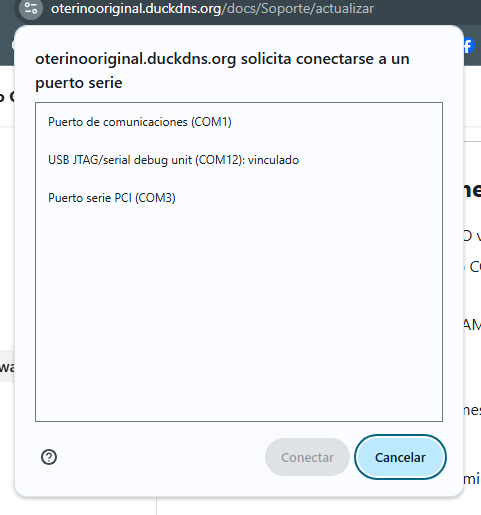
Select the device and press connect.
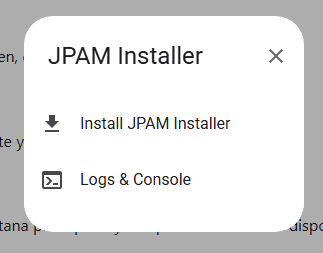
Click install and accept.
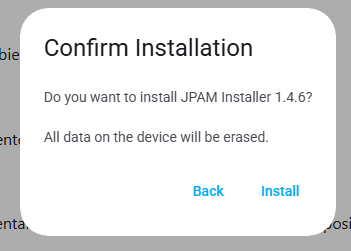
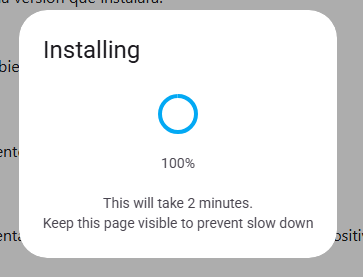
In a few seconds, the new firmware will be installed on the Timer. Then you only need to check that everything works correctly.
Press Next and the option to load another firmware will appear. If everything has gone well, press Cancel.
Available Firmwares
JPam_NEO_V1
V1 is the validated basic version for the initial JPam_NEO launch.
| Firmware | Date | Status | Release Notes | Flash |
|---|---|---|---|---|
| 1.4.7 | 09/07/2026 | Current Stable | Slower in-flight LED pulse rate, persistent visual landing warning until cycle stop, and smoothed motor warning pulse. | |
| 1.4.6 | 09/07/2026 | Previous Stable | Previous stable release published on the web installer. |
JPam_NEO_F2G
JPam_NEO_F2G is available as a beta version for validation. Use this version only if you are sure your Timer corresponds to F2G.
F2G Timer
| Firmware | Date | Status | Release Notes | Flash |
|---|---|---|---|---|
| 0.14.3 beta | 20/08/2026 | Beta | Initial public beta build for F2G published to the web installer. Features BLE configuration, PWM ESC signal output, and TX binding protocol per 0.14.3 specs. |
F2G TX
Firmware for the external JPam_NEO_F2G_TX controller. Use this option only to flash the TX, not the Timer.
| Firmware | Date | Status | Release Notes | Flash |
|---|---|---|---|---|
| 0.14.2 beta | 23/08/2026 | Beta | Beta firmware for the external F2G controller. MAX_POWER is enabled only after the Timer confirms cruise state, with a 500 ms safety margin. |
Future Releases
JPam_NEO_V4, JPam_NEO_V5 and JPam_NEO_FF will be added to this page when public firmware is ready for web installation.
Troubleshooting Connection Issues
- Try another USB port.
- Use another USB data cable.
- Close other programs that may be using the serial port.
- If necessary, connect the Timer while holding BOOT.